
Programming for fun.
Objective
To be able to perform simple operations using a Python script by writing the equations.
Introductory Statement
A calculator is something used for making mathematical calculations, in particular a small electronic device with a keyboard and a visual display. The purpose of this project is performing simple calculations on a Python console.
Results
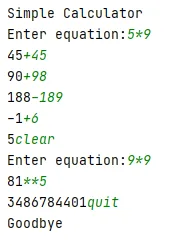
Historical Parser Limitations
The retained code removes parentheses and decimal points before evaluation, changing the meaning of some valid expressions, and uses eval rather than a restricted arithmetic parser. Its zero-valued previous-result state also needs to be distinguished from having no previous result; the snippet documents the original console project, not a reference implementation for general expression handling.
Testing and Real-World Use
This could be tested with a table of valid expressions, decimals, parentheses, division by zero and missing operands, checking that invalid input produces an explicit error. Separating parsing, arithmetic and presentation is useful for reliable calculation tools, while the historical parser below is not suitable for untrusted input.
Code
import re
print("Simple Calculator")
previous = 0
run = True
def performMath():
global run
global previous
equation = ""
if previous == 0:
equation = input("Enter equation:")
else:
equation = input(str(previous))
if equation == "quit":
print("Goodbye")
run = False
elif equation == "clear":
previous = 0
else:
equation = re.sub('[a-zA-Z,.:()]','',equation)
if previous == 0:
previous = eval(equation)
else:
previous = eval(str(previous) + equation)
while run:
performMath()